Showing posts with label CI/CD integration. Show all posts

Wednesday, June 4, 2025

Prevent Security Vulnerabilities With Static Code Analysis


Let's Talk About That One Bug You Missed

Have you ever ship code thinking it's solid, only to get hit with a critical vulnerability later? Yeah. It happens to the best of us. But what if you could catch those security holes before your app even runs? That's where static code analysis comes in.

It doesn’t just scan your code, it dissects it. It digs into logic, finds dangerous patterns, and throws red flags before anything gets to production. This isn't some theoretical DevSecOps mumbo jumbo. Static analysis is the first real defense in your security playbook.

Want to harden your product from the start? Check out our custom software development services that integrate security by design.

What Is Static Code Analysis?

Static code analysis (SCA) means inspecting source code without executing it. It uses tools to catch errors, vulnerabilities, and anti-patterns in the early dev phase.

What It Detects

  • SQL injection risks

  • Cross-site scripting (XSS)

  • Insecure deserialization

  • Hardcoded credentials

  • Deprecated APIs

Basically, anything that might cause your app to break, leak data, or be hijacked.

Bonus

  • Improves code quality

  • Enforces style guides

  • Catches bugs early

This is different from dynamic analysis, which tests code during runtime. Static is fast, automatic, and works during CI/CD pipelines. For a breakdown of how this fits into your DevOps stack, read Secure Your API Endpoints With Proven DevOps Techniques.

Real-World Breaches That Could've Been Prevented

Let’s not pretend this is theory. Static analysis could have prevented some big-name disasters:

  • Equifax breach (2017): Apache Struts vulnerability left unchecked

  • Heartbleed bug (OpenSSL): Poor bounds checking

  • Capital One hack: Server-side request forgery missed in testing

Every single one? Detectable before deployment with proper SCA tools.

Tools That Actually Work

You don’t need a dozen scanners. You need the right ones.

Top Static Analysis Tools

  • SonarQube – Open-source, great for code quality and security rules

  • Semgrep – Lightweight, rule-based, highly customizable

  • Checkmarx – Enterprise-level security with deep scan capabilities

  • Codacy – Auto feedback on GitHub/GitLab commits

  • Bandit – Python-specific security checker

What to Look For

  • OWASP Top 10 compliance

  • Language support (JavaScript, Python, Java, etc.)

  • CI/CD integration (GitHub Actions, GitLab CI, Jenkins)

  • Custom rulesets

Want a CI/CD pipeline that already includes security scans? We cover that in our article: How to Set Up a CI/CD Pipeline in GitHub Actions for Your Web App.

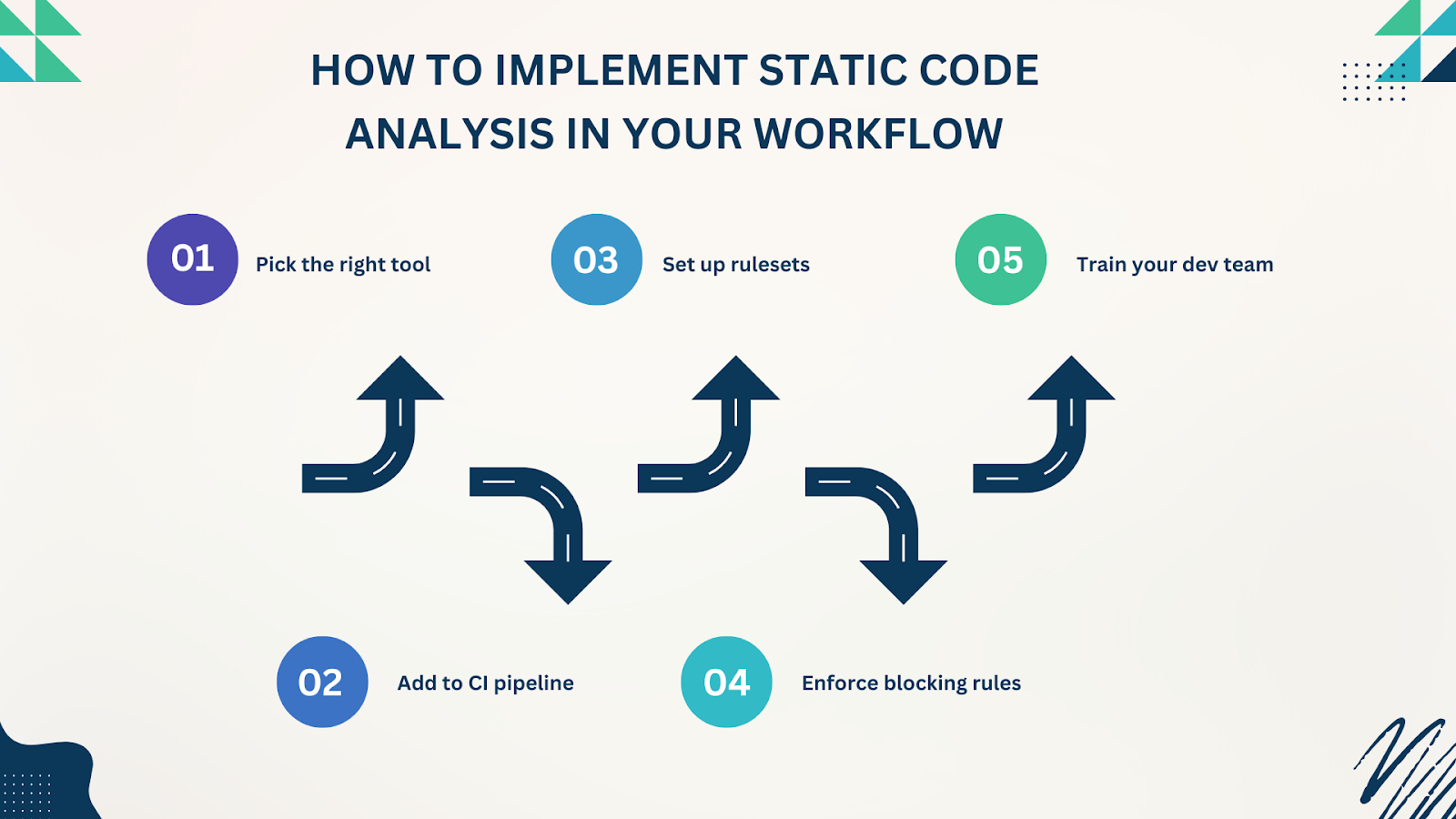
How to Implement Static Code Analysis in Your Workflow
Step-by-Step:

  1. Pick the right tool for your language and framework.

  2. Add to CI pipeline – GitHub Actions, GitLab CI, Jenkins, etc.

  3. Set up rulesets based on OWASP Top 10 or project-specific risks.

  4. Enforce blocking rules for critical vulnerabilities.

  5. Train your dev team to interpret and fix issues proactively.

Bonus: Use tools that provide inline comments on pull requests to reduce friction.

The ROI of Static Analysis

Sure, it takes a few hours to set up. But it pays off fast:

  • Reduces the cost of fixing bugs by up to 30x (compared to post-release)

  • Boosts developer confidence

  • Improves team velocity

  • Builds trust with customers & stakeholders

Studies show that organizations using SCA report a 70% reduction in security incidents tied to coding errors.

Make It Non-Negotiable

Here’s the deal: security should be part of your dev process, not an afterthought. Static code analysis makes that possible, without slowing you down.

If you're building products that scale or handle sensitive data, SCA isn't a nice-to-have—it's a requirement.

Ready to integrate secure coding practices from the start? Explore our UI/UX design and software development strategies at Bluell. We design and build with security in mind from wireframe to deployment.

Final Thought

You don’t need to fear bugs you haven’t found yet. Just set up static code analysis. Let the tools do the heavy lifting. You’ll write better code, build more secure apps, and sleep better at night.

And if you’re serious about building with quality and security as defaults, talk to us at Bluell AB. We don’t just write code. We build defensible digital products.

Wednesday, May 14, 2025

How to Run Cross-Browser Testing Without Losing Your Mind


Cross-browser testing in 2025 is still a big deal. Users don’t care what browser you built your app on. They expect flawless performance on Chrome, Safari, Firefox, Edge, and everything in between. Ignoring compatibility can break conversions, damage user trust, and wreck your user experience. Whether you're launching a new feature or patching bugs, cross-browser testing ensures your app delivers a consistent, reliable experience everywhere.

What Is Cross-Browser Testing?

Cross-browser testing is the process of verifying that your web app or website functions as intended across different browsers, operating systems, and devices. It involves checking:

  • Layout consistency

  • Functional integrity

  • JavaScript and CSS behavior

  • Responsive performance

With a growing number of browser versions and screen resolutions, cross-browser testing is now more critical than ever, especially for businesses relying on digital products to drive engagement and conversions.

If you're building a new platform or optimizing an existing one, cross-browser compatibility should be part of your core web development strategy. Without it, you risk alienating users on certain browsers or devices, reducing your reach and effectiveness.


Why Skipping Cross-Browser Testing is a Costly Mistake

Let’s talk real-world consequences. According to a survey by HubSpot, 88% of users won’t return to a site after a bad experience. Imagine losing almost 9 out of 10 potential customers because your app doesn't render well on Safari or breaks on older versions of Chrome.

Cost of Skipping Tests:

  • Loss in user engagement

  • Decreased conversions and revenue

  • Negative brand perception

  • Higher support costs

Browser testing isn’t optional. It’s table stakes.

Step 1: Know Your Audience and Their Devices

Before diving into cross-browser testing, understand your users. What browsers do they use? What devices? Analytics tools like Google Analytics or Hotjar can show browser and device breakdowns.

Pro Tip:

  • Focus on browsers that represent at least 5% of your user base

  • Don’t waste time testing obscure browsers unless your audience uses them

Knowing your battlefield is half the war.

Step 2: Build with Cross-Browser Compatibility in Mind

Testing should start at the development stage. Build your app using web standards and tools that are widely supported. 

Best Practices:

  • Use standardized CSS and avoid experimental features unless polyfilled

  • Don’t rely on browser-specific hacks

  • Test early, test often

  • Use frameworks and libraries known for compatibility (e.g., React, Bootstrap)

By making cross-browser readiness a part of your development workflow, you avoid firefighting later.. Build your app using web standards and tools that are widely supported.

Step 3: Choose the Right Cross-Browser Testing Tools

Let the tools do the heavy lifting. You don’t need 20 devices on your desk anymore. Use cloud-based platforms.

Top Tools for Cross-Browser Testing:

  • BrowserStack: Live, automated, and visual testing

  • Sauce Labs: Extensive support for real devices and browsers

  • LambdaTest: Real-time testing and screenshots

  • CrossBrowserTesting by SmartBear: Manual and automated testing

Most tools support integrations with CI/CD pipelines, so you can automate sanity checks.

Step 4: Run Tests Based on Critical User Flows

Don’t test every pixel on every screen. Focus on what actually matters to the user.

Identify Core Flows:

  • Logins

  • Checkout processes

  • Form submissions

  • Navigation and routing

  • Media playback (if relevant)

Write automated tests or manual checklists for these flows. If they break, the user bails.

Step 5: Automate Where Possible, But Don’t Ignore Manual Testing

Automation saves time, but human eyes still matter.

What to Automate:

  • UI regressions

  • Functional validations

  • Visual diffs

What to Test Manually:

  • Animations

  • Hover effects

  • Touch gestures on mobile

Combining both approaches gives you a holistic view of your app’s real-world performance.

Step 6: Test on Real Devices

Emulators are good, but real devices are better. Network variations, gesture inputs, and rendering quirks often differ.

Quick Tip: Use BrowserStack or Sauce Labs for real device testing at scale. Or test on actual physical devices for critical flows.

Step 7: Monitor Post-Deployment Issues

After launch, it’s not game over. Real-world usage will reveal new bugs.

Monitoring Tools:

  • Sentry: Frontend errors and breadcrumbs

  • LogRocket: Replays of user sessions

  • Google Analytics: Behavior metrics

  • Datadog: Performance bottlenecks

Catch browser-specific issues before they snowball. Continuous monitoring is key to user satisfaction.

Bonus: How Cross-Browser Testing Impacts SEO and Accessibility

Google cares about usability. Sites that break on certain browsers or devices can get penalized in rankings. And let’s not forget accessibility—it’s not just ethical, it’s required in many markets.

SEO Benefits of Cross-Browser Testing:

  • Better page load times

  • Fewer bounce rates

  • Improved mobile-friendliness scores

Accessibility Considerations:

  • Screen reader compatibility

  • Keyboard navigation

  • Contrast and font readability

Improving browser compatibility can boost both UX and your organic visibility.

Conclusion

Cross-browser testing isn’t a checkbox to tick off once. Make it a part of your QA, CI/CD, and launch routines.

Quick Summary:

  • Know your audience’s browsers

  • Use web standards

  • Automate critical flows

  • Test on real devices

  • Monitor in production

Your users don’t care about your dev stack. They care that your product works. Everywhere. Always.


UX Red Flags: Why Users Drop Off During Onboarding

  The first few minutes a user spends in your app or product are make-or-break. Onboarding UX isn’t just about tutorials and tooltips; it’s...