
Tuesday, July 8, 2025

Ensure 99.9% Uptime via Proactive Monitoring & Maintenance


In the world of web applications and digital platforms, ensuring 99.9% uptime isn't just a technical metric; it's a business necessity. Every minute of downtime can mean lost revenue, frustrated users, and a damaged reputation. Yet, keeping systems consistently online doesn't happen by chance. It requires a well-structured approach to proactive monitoring and regular maintenance.

If you're wondering how modern systems are designed to stay online under pressure, a full-stack development approach often holds the answer. From the way services are modularized to how caching, rate limiting, and failover mechanisms are baked in early, thoughtful architecture decisions play a huge role in long-term uptime, even before monitoring tools come into play.

What Does 99.9% Uptime Really Mean?

Let’s put things in perspective. 99.9% uptime equals:

  • Roughly 8 hours and 45 minutes of downtime per year

  • Just 10 minutes and 5 seconds per week

Compare that to 99% uptime (which allows 3 days of downtime per year), and the importance of that extra .9% becomes clear.

For businesses running eCommerce platforms, SaaS products, or critical internal systems, those extra hours of availability make a significant difference in customer experience and operational continuity. Many teams achieve this level of reliability by integrating observability, scalability, and fault-tolerant backend architecture, approaches often covered in depth in backend-focused planning, like this backend development overview.

Why Proactive Monitoring Matters

Proactive monitoring means you detect issues before users do. Instead of reacting to outages, you’re preventing them.

Core Benefits:

  • Early detection of errors: Spot CPU spikes, slow database queries, or unusual traffic.

  • Minimize Mean Time to Repair (MTTR): Act quickly with real-time alerts.

  • Avoid cascading failures: Fix small issues before they take down entire services.

  • Track performance trends: Understand system health over time.

Modern observability tools such as Datadog, New Relic, and Prometheus with Grafana help developers monitor logs, metrics, and traces in real time.

According to a 2024 OpsRamp study, companies with proactive monitoring in place experience 45% fewer critical incidents annually.

Key Metrics You Should Monitor

Monitoring uptime goes beyond just pinging a server. To maintain true resilience, you need to monitor metrics across the entire tech stack.

  • Server Health: CPU usage, memory consumption, disk I/O

  • Database Performance: Query latency, slow logs, connection pools

  • API Response Times: Latency spikes, timeout rates

  • Error Rates: 5xx and 4xx HTTP errors

  • Traffic Trends: Requests per second, user location spikes

Automation in Maintenance Routines

Manual upkeep won’t scale. Teams now rely on automation to handle updates, patches, and configuration changes.

Examples of Proactive Maintenance Automation:

  • Scheduled database backups and validation

  • Rolling updates via CI/CD pipelines

  • Autoscaling policies on cloud platforms

  • Security patching scripts and infrastructure-as-code (IaC)

Using tools like Ansible, Terraform, and Jenkins, teams create predictable and repeatable routines that reduce human error.

We previously covered how automated CI/CD pipelines reduce downtime in our blog post on CI/CD best practices.

Incident Response and Alerting Best Practices

Proactive monitoring is only useful if there’s a clear plan when something goes wrong. That’s where incident response frameworks come into play.

Must-Have Alerting Features:

  • Multi-channel notifications: Slack, SMS, Email, PagerDuty

  • On-call rotations: Assign responsibility based on schedules

  • Escalation policies: Ensure alerts reach the right person

  • Silencing rules: Avoid alert fatigue from noisy services

Tools like Opsgenie or VictorOps help integrate alerts directly into team workflows, ensuring fast and informed responses.

Maintenance Windows: Planning the Inevitable

Sometimes, downtime is necessary but planned. Routine maintenance windows allow you to:

  • Upgrade systems with minimal impact

  • Conduct performance tuning and resource optimization

  • Swap or decommission outdated infrastructure

Communicating these windows to users is critical. Most businesses do this via email, in-app banners, or dedicated status pages.

Pro Tip: Use canary deployments or blue-green deployment strategies to reduce downtime risk during updates.

Real-World Use Case: Scaling with Stability

One of our enterprise clients needed to maintain high availability during a major platform overhaul. With millions of users and real-time data sync, even minutes of downtime could result in losses.

What Worked:

  • Deployed real-time monitoring using Prometheus + Grafana dashboards

  • Set up auto-healing groups on AWS EC2

  • Established alert channels for critical services

  • Conducted dry runs of rollback and failover procedures

Result: Uptime went from 99.2% to 99.97% over six months, and the client maintained full transparency with customers during scheduled maintenance.

Beyond Tech: Culture of Reliability

Ensuring uptime isn’t just a tech problem, it’s a team mindset.

  • Postmortems after incidents to identify root causes

  • SLAs and SLOs that guide priorities and accountability

  • Blameless retrospectives to encourage learning over punishment

  • Knowledge sharing across DevOps, product, and engineering teams

Companies that build a culture of reliability are more resilient, more transparent, and better positioned to grow.

Final Thoughts

Achieving and maintaining 99.9% uptime isn’t about perfection. It’s about preparedness. Proactive monitoring combined with well-tuned maintenance processes helps teams detect issues early, resolve them fast, and continuously improve reliability.

This isn’t a one-time setup—it’s a system that matures over time with the right tools, practices, and people in place.

For teams looking to evolve their platform resilience, it helps to align monitoring with your broader full-stack development strategy, making sure every layer from front to backend is designed with uptime in mind.




Wednesday, July 2, 2025

How to Implement Feature Flags in Your App


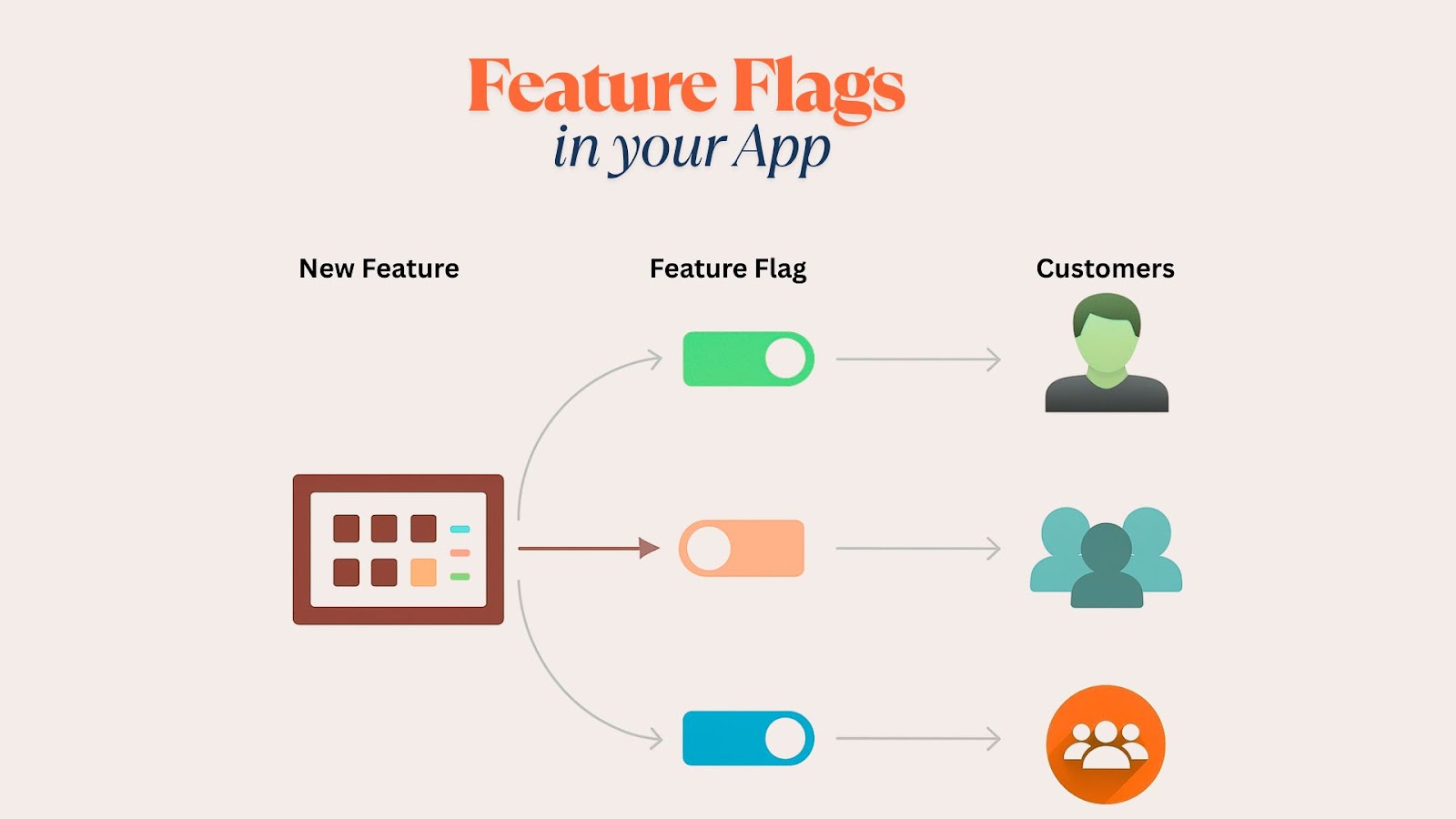
Feature flags, also known as feature toggles, are one of those underrated tools that can completely transform how you roll out updates, test new features, or manage user experiences in production. If you’ve ever pushed code late at night while praying nothing breaks, feature flags might just be your new best friend.

In this article, we’ll walk you through the concept of feature flags, their practical implementation, and best practices for managing them at scale. Whether you're working in a startup MVP or deploying at an enterprise level, mastering feature flagging is essential for modern full-stack development.

What Are Feature Flags, and Why Should You Use Them?

At their core, feature flags are conditionals in your codebase that toggle functionality on or off. Think of them as “if” statements with a remote control; you can activate or deactivate features for specific users, environments, or geographies without redeploying your app.

Benefits:

  • Safe rollouts: Release new features gradually without affecting your entire user base.

  • A/B testing: Compare feature variations in real time.

  • Quick rollback: Disable features instantly in case of failure.

  • Continuous delivery: Deploy unfinished code without exposing it to users.

According to a 2024 LaunchDarkly survey, teams using feature flags deploy 70% faster and reduce incident frequency by 40%.

Types of Feature Flags

Not all flags are created equal. Depending on your goal, you'll choose a different type of flag:

  • Release flags: Control when a feature becomes visible.

  • Experiment flags: Toggle different feature versions for A/B testing.

  • Ops flags: Turn infrastructure or backend behavior on/off.

  • Permission flags: Show features to specific users or roles.

Each flag type plays a distinct role depending on where it's implemented; frontend toggles often relate to UI/UX adjustments, while backend flags typically manage logic flows or infrastructure behavior. Understanding how these backend-level toggles impact system operations is part of what makes robust backend development practices so critical in modern applications.

When to Use Feature Flags

Here’s when feature flags are particularly useful:

  • Launching beta features for early adopters

  • Managing different feature sets across free vs. paid accounts

  • Handling time-sensitive promotions or seasonal features

  • Testing experimental UI elements in production

  • Rolling out bug fixes gradually to monitor the impact

They’re not just for fancy SaaS tools. Even small apps benefit from controlled rollouts.

How to Structure Feature Flags in Your Code

The real challenge? Keeping flags manageable as your app grows. Here’s how to implement them cleanly:

1. Centralized Configuration

Instead of scattering flags across files, maintain a central config (JSON, YAML, or ENV).

Use a config loader that your frontend or backend can query. This ensures flags are consistent across components.

2. Environment-Specific Flags

Create separate configurations for dev, staging, and production environments. This prevents dev-only flags from leaking into live code.

3. Remote Flag Services (Optional)

For larger teams, third-party platforms like LaunchDarkly, Flagsmith, or Unleash allow real-time flag updates without code changes. They offer SDKs, dashboards, and analytics to manage flags at scale.

Best Practices for Managing Feature Flags

Feature flags are powerful, but without discipline, they can become a mess.

Keep Flags Temporary

Every flag should have a sunset plan. Document when it was added, who owns it, and when it should be removed.

Name Flags Clearly

Use descriptive, consistent naming:

  • enable_dark_mode

  • use_checkout_v2

  • beta_dashboard_access

Avoid vague names like flag1 or new_feature.

Version Control Flag Configs

If you're storing flag logic in code, treat it like any other config. Use Git, review changes, and sync across teams.

Don’t Overflag

Not every feature needs a flag. Use them strategically. Too many flags = unmanageable tech debt.

Monitor Flag Usage

Track how often flags are accessed and by whom. If a flag is no longer being used, it’s time to retire it.

Real-World Example: Rolling Out a Payment Gateway

Let’s say you’re integrating a new payment provider. Rather than pushing it live to all users:

  1. Create a release flag: use_stripe_v2

  2. Default to false in production config

  3. Enable for internal testers via user ID check

  4. Roll out to 10% of users using a hash-based rollout

  5. Monitor performance and errors

  6. Gradually expand to the full audience once stable

  7. Delete the flag once full migration is complete

This process reduces risk, increases visibility, and builds confidence in each release.

Common Pitfalls to Avoid

  • Forgetting to remove old flags leads to bloated, hard-to-read code.

  • Hardcoding logic: Always check configs instead of embedding flags in business logic.

  • Lack of ownership: Every flag should have an assigned owner responsible for cleanup.

  • Skipping tests: Yes, you need to test both flag-on and off scenarios.

Tools That Support Feature Flagging

Besides building your own config system, there are great tools designed to handle feature toggles:

  • LaunchDarkly: Enterprise-grade with analytics and targeting.

  • Flagsmith: Open-source and self-hostable.

  • Unleash: Built for teams wanting full control over flag infrastructure.

  • ConfigCat: Simple UI, good for startups.

Each tool has SDKs for major languages including JavaScript, Python, Go, and Java.

📌 Curious how these integrate with CI/CD pipelines? Read our blog post on setting up GitHub Actions with feature flagging.

Wrapping Up: Feature Flags Are a Long-Term Investment

When implemented well, feature flags empower your team to ship confidently, experiment safely, and deliver tailored user experiences without fear of breaking production.

They may seem simple, but their power lies in how you manage them, from naming and cleanup to rollout strategy and monitoring.

Feature flagging isn’t just a tool for engineers; it’s a bridge between product, QA, marketing, and development. If you're already using modular or service-based systems, adding feature flags is a natural next step.

Looking to improve how you roll out updates across environments and user types? See how the full-stack development approach handles version control, feature segmentation, and release flexibility.


UX Red Flags: Why Users Drop Off During Onboarding

  The first few minutes a user spends in your app or product are make-or-break. Onboarding UX isn’t just about tutorials and tooltips; it’s...